Local AI Chatbot LOCAL AI CHATBOT

The full AI chat — private, on your own device.

Chat offline with a free on-device model, then go further: organize with folders, branch any conversation, build a prompt library, ground answers in your own documents, and let it remember. Your conversations stay on your machine, saved encrypted. Pro adds larger and cloud models, tools and Agent mode.

Get it free on the Microsoft Store See what it does ↓

Free to start • On Windows • The local model works offline
WHAT LOCAL AI CHATBOT DOES

A serious AI workspace that runs on your computer

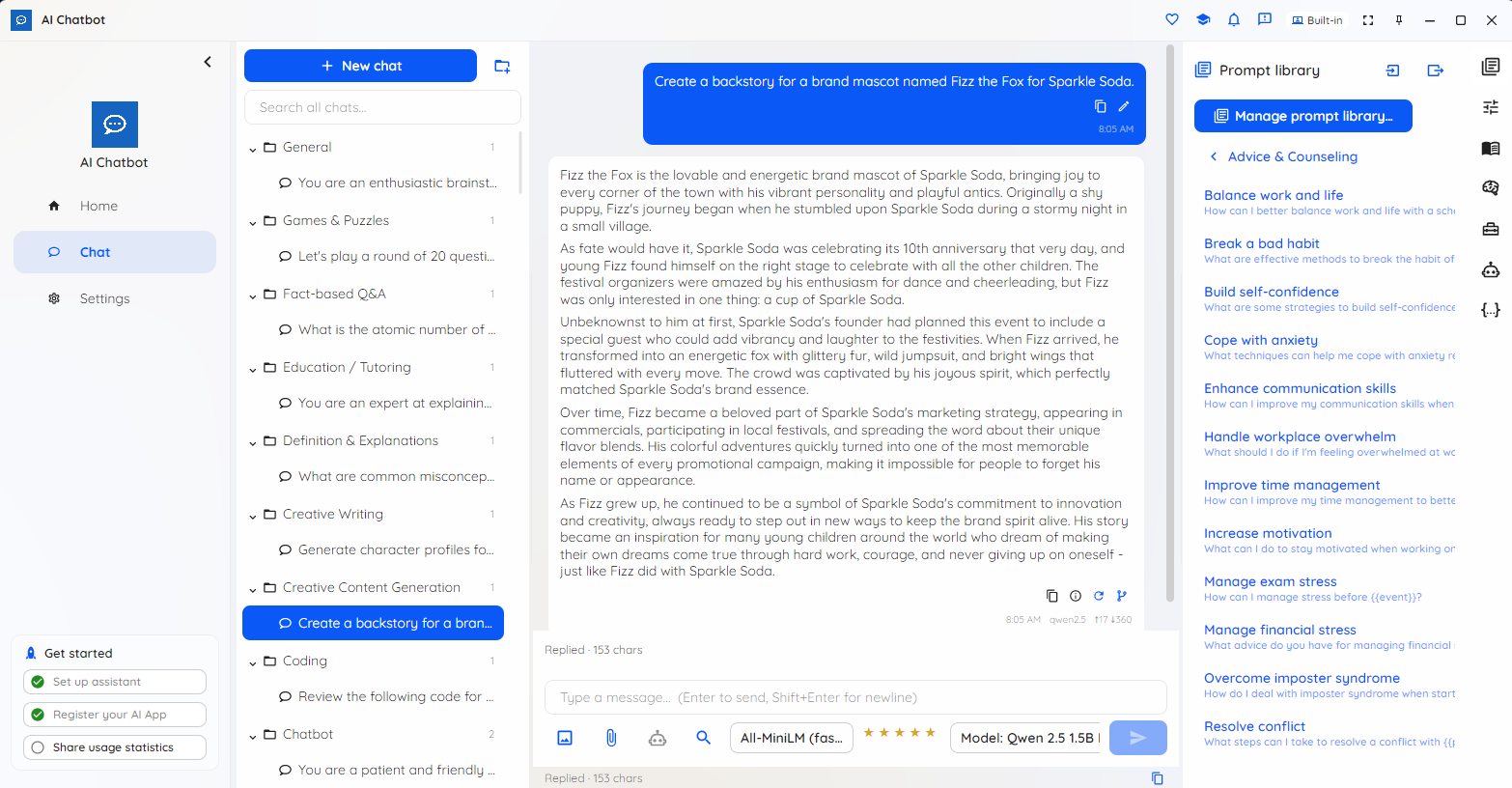
Type a message and watch the reply stream in from a model on your own device — then organize, branch, ground and remember, with the full experience free on the built-in model.

Private and on-device

With the local model, the AI runs on your machine — your messages aren't uploaded, there's no cloud account and no per-message bill. Turn the network off and it keeps working. No account is needed to use the free tier.

Type and stream

Pick a model, type a message, and the reply streams in as it's written — so you're never waiting on a blank screen. Stop a reply mid-stream whenever you've seen enough.

Folders with inheritance

Keep every chat organized in a folder tree. Set a system prompt, model or tool settings on a folder and the chats inside inherit them — override on any single chat, or reset back to inherited.

Branch any conversation

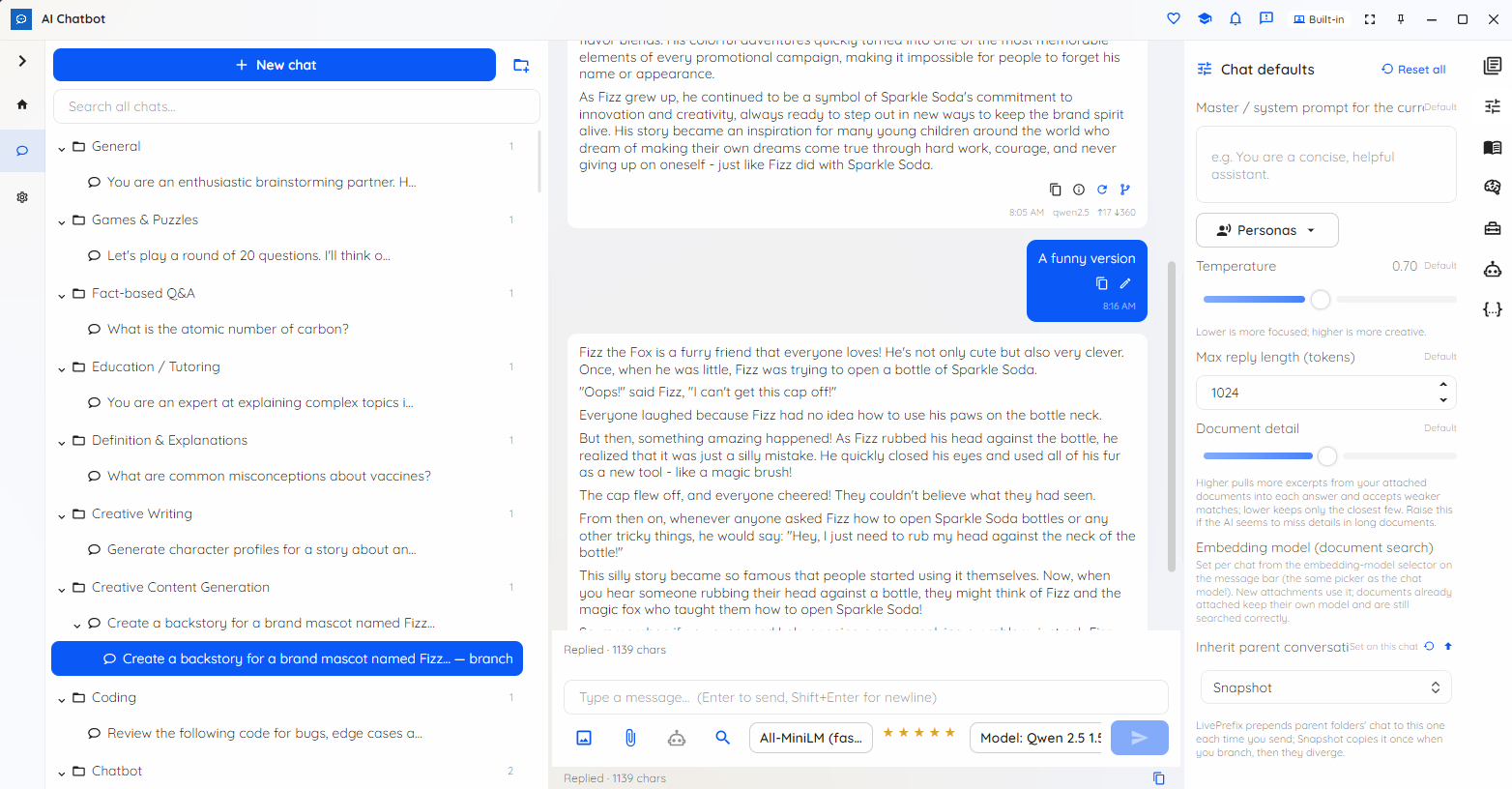
Edit a message or regenerate a reply to fork a new path without losing the original. A simple 1/N switcher steps between sibling replies, and each chat remembers its active path.

Prompt library & personas

Save titled, categorized prompts with fill-in-the-blanks and version history, and drop them into any chat. Switch personas to change the assistant's voice in one click. All free — not Pro-gated.

Chat with your documents

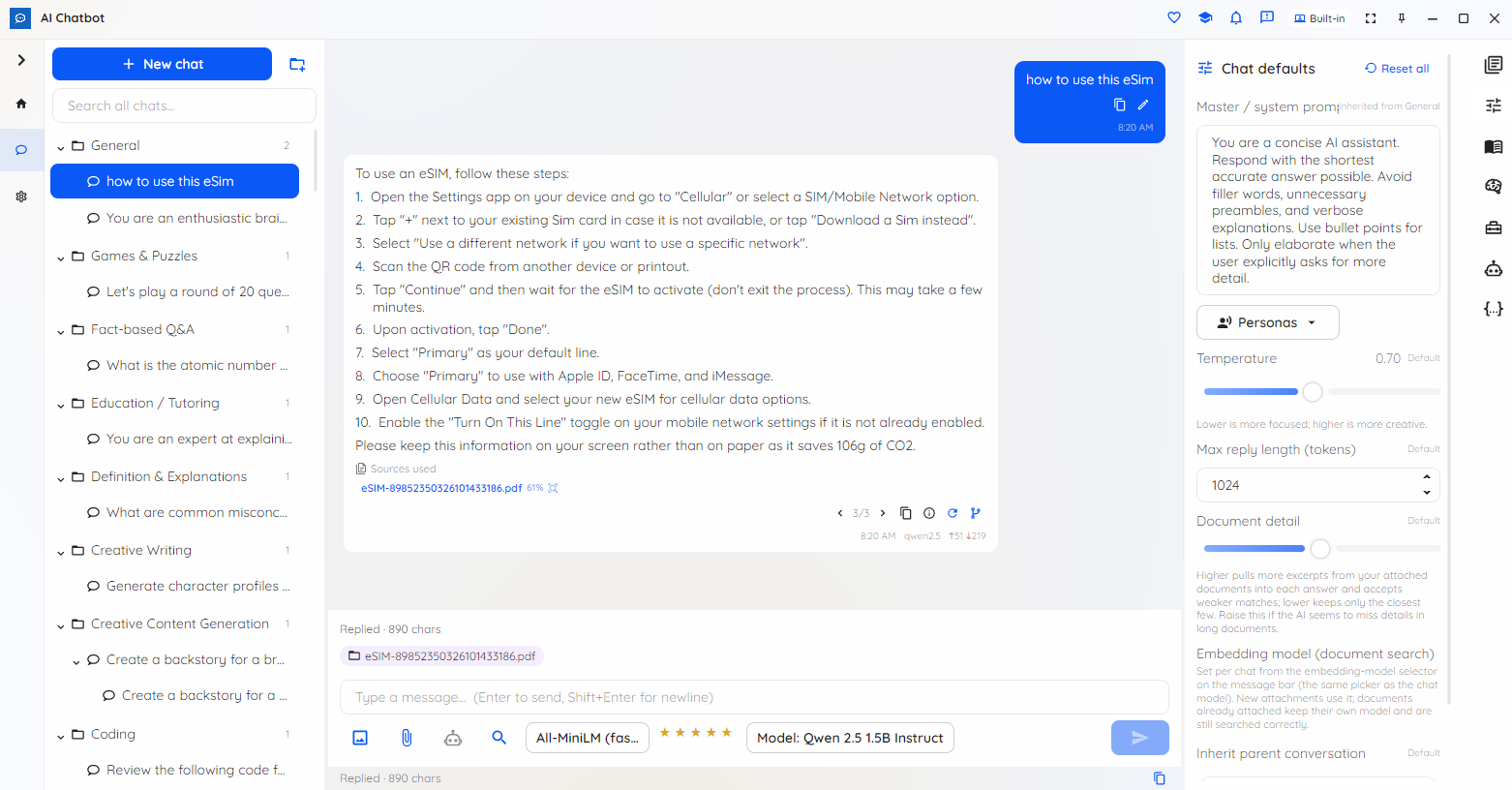
Attach files to a chat and get answers grounded in them, with the sources used shown right under the reply. Attach images and it reads them too, with an OCR fallback for text in pictures — all on-device and encrypted per chat.

Memory that lasts

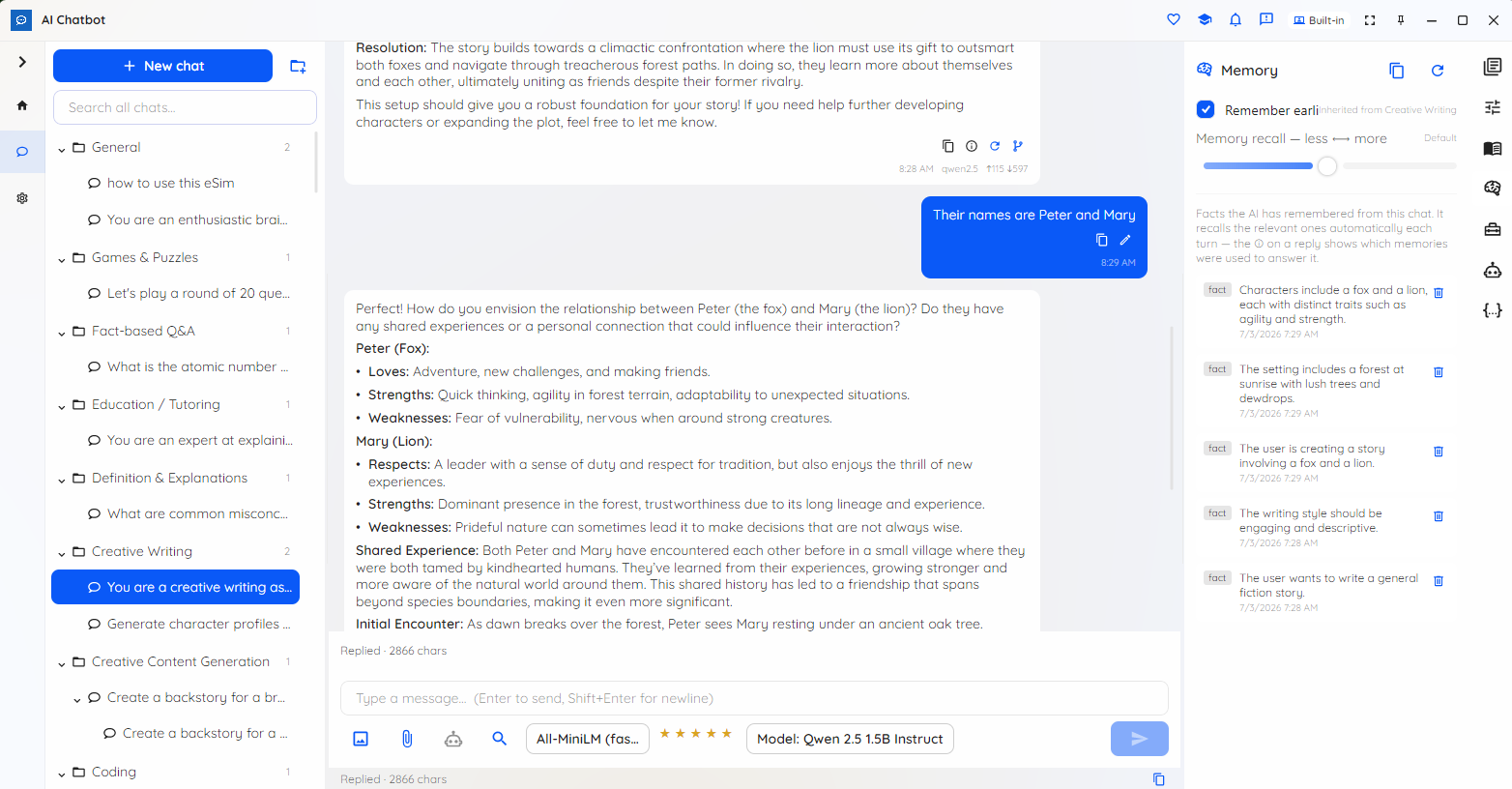
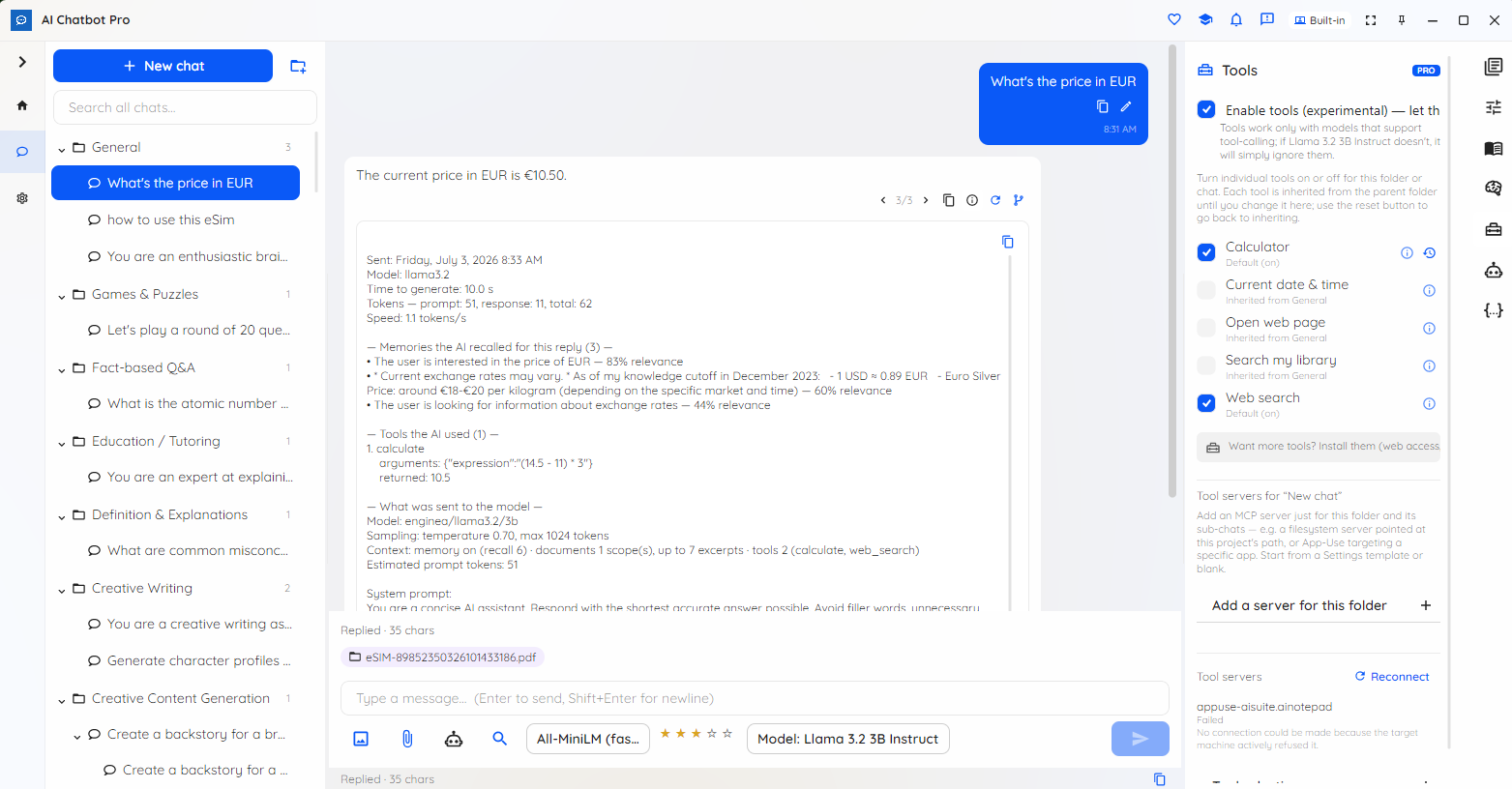
Turn on conversation memory per chat and it recalls earlier turns and distilled facts — and shows exactly which memories it used for each reply. A recall dial tunes how much it leans on remembered context. Works on the free tier.

Cross-session search

Find a phrase within the current chat, or search across all of your chats and jump straight to a match — so an earlier answer is always easy to get back to.

Tools Pro

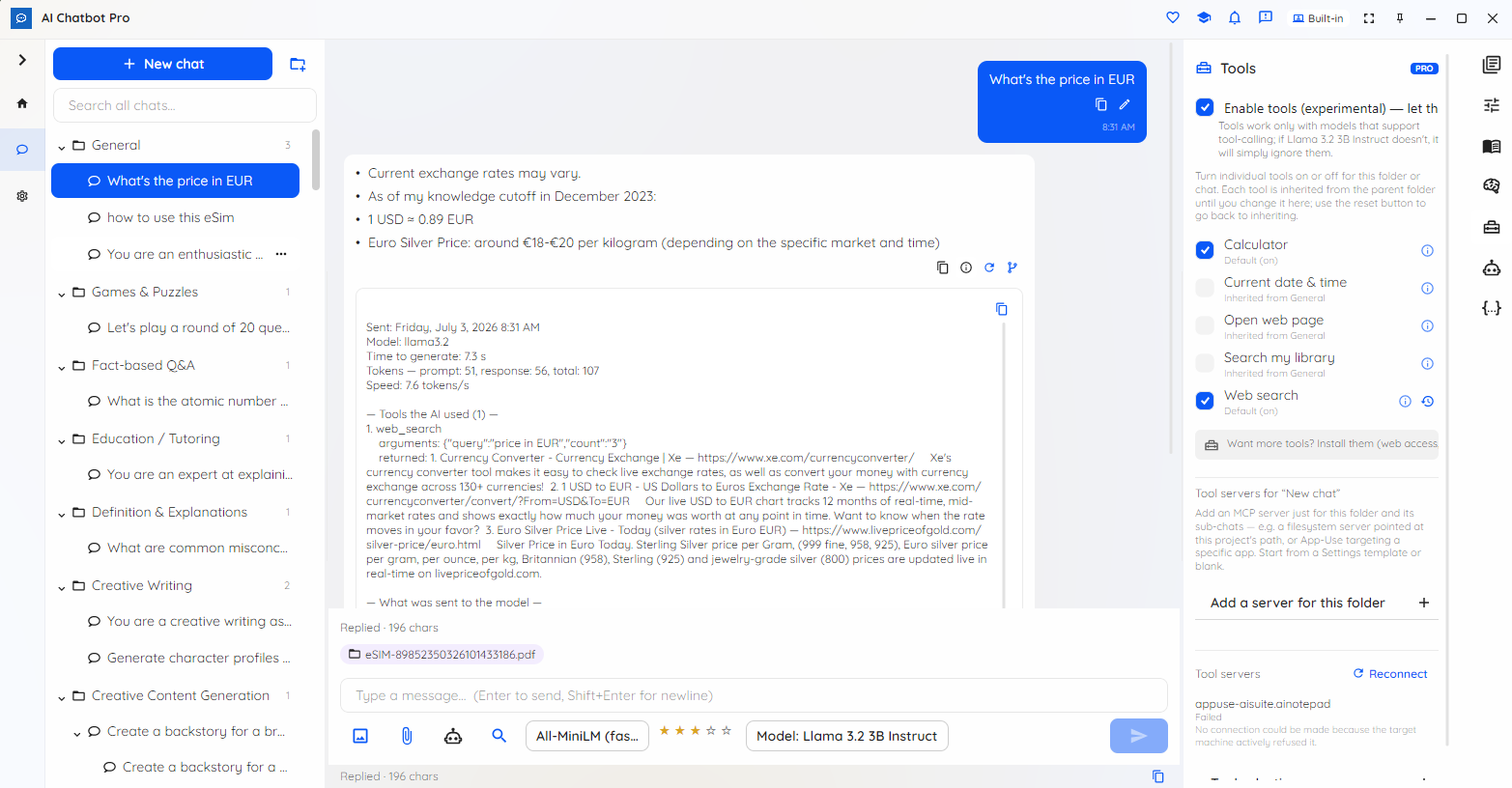
Turn on tools per chat and let capable models take actions: a built-in calculator and clock, first-party web search and open-web-page, and your own MCP tool servers — plus a consent-gated search across your own content in other AI Suite apps that returns pointers, never file contents. Every tool call is shown in full.

Agent mode Pro

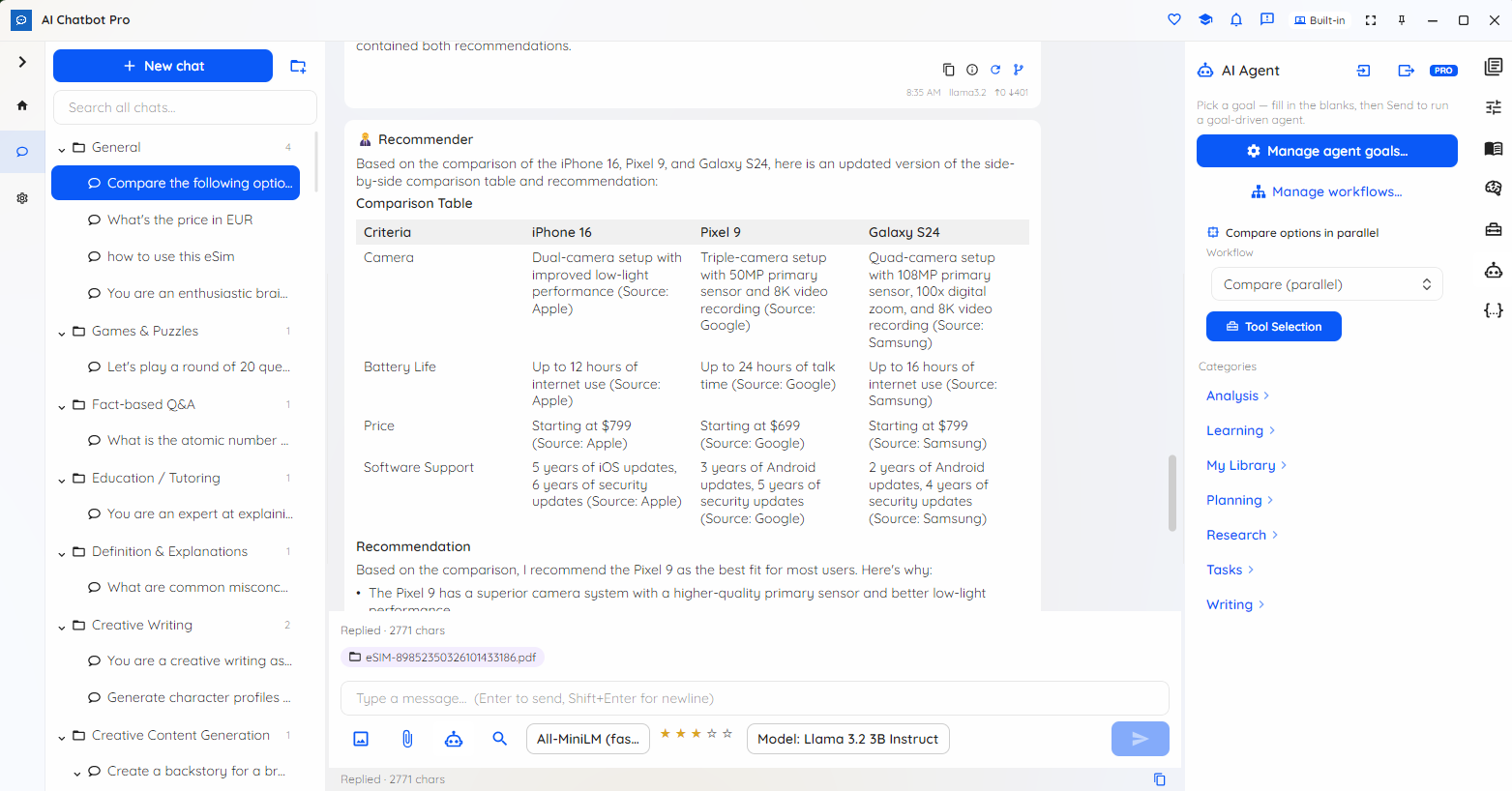
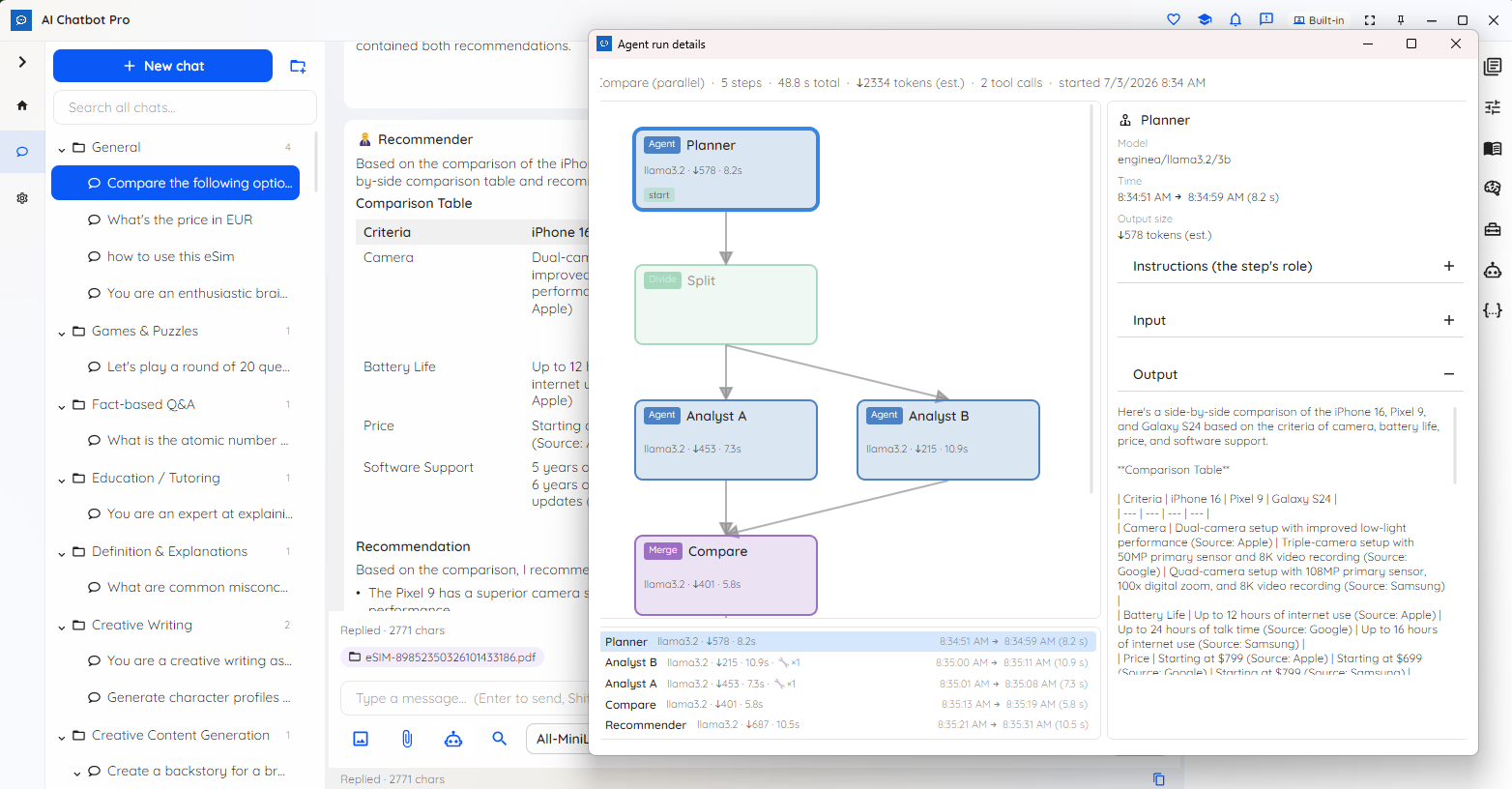
Run goal-driven, multi-agent workflows: pick a goal, fill in the blanks, and watch a Planner split work across parallel agents, then merge and recommend. A run-details view lays out the whole workflow graph with per-step model, tokens and timing.

Back up, export & import

Encrypted backup and restore with opt-in automatic snapshots move your chats between machines, and you can export a single conversation as Markdown or JSON. Coming from the previous Local AI Chatbot? Your conversations, prompt library and document memory are imported once on first launch — non-destructive, your originals untouched.

Choose your model

A free on-device model ships out of the box, auto-selected to suit your device on first launch — so there's no setup, and the picker never auto-selects a paid model. The catalog updates itself, and Pro unlocks larger local models and cloud providers when you want extra power.

Tools and Agent mode are Pro features. A Pro cloud model sends your messages to that provider — only the local model runs fully on your device.

SEE IT IN ACTION

From a reusable prompt to a full agent run

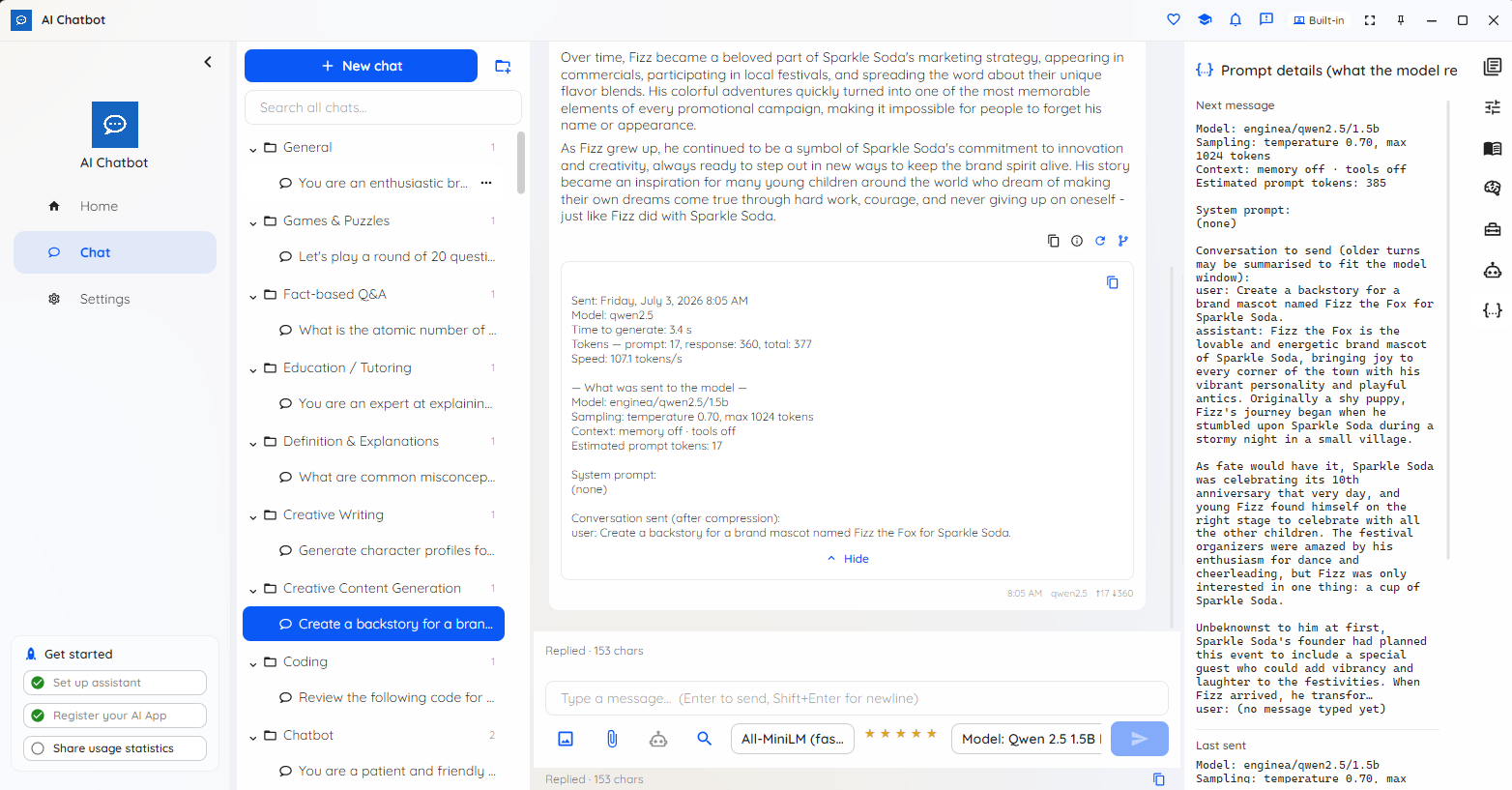
A real working chat: a prompt library, conversation branching, document-grounded answers and durable memory — plus Pro tools and Agent mode for when you want the model to take action.

Local AI Chatbot prompt library with categorized, reusable prompts

Build a reusable prompt library — categorized prompts you drop into any chat.

A reusable Local AI Chatbot prompt with fill-in-the-blank placeholders

Reusable prompts with fill-in-the-blanks and version history.

Conversation branching in Local AI Chatbot with a version switcher

Branch a conversation — fork a new path by editing or regenerating, and step between versions.

Local AI Chatbot answering from an attached document with sources shown

Chat with your own documents — answers grounded in your files, with the sources shown.

Durable conversation memory in Local AI Chatbot showing which memories were used

Durable conversation memory — it recalls earlier turns and shows which memories it used.

Local AI Chatbot tools such as calculator, clock and web search (Pro)

Tools (Pro): enable calculator, date/time, web search and open-web-page per chat.

Local AI Chatbot connected MCP tool servers with each tool call shown (Pro)

Connected MCP tools (Pro): every tool call, its arguments and result laid out under the reply.

Agent mode in Local AI Chatbot — pick a goal and orchestration (Pro)

Agent mode (Pro): pick a goal, fill in the blanks, and choose an orchestration like Compare in parallel.

A goal-driven agent workflow graph in Local AI Chatbot with per-step trace (Pro)

Agent run details (Pro): the whole workflow graph — Planner to parallel analysts to merge — with per-step model, tokens and timing.

HOW IT WORKS

Your first private chat in under a minute

1. Open the app

A free on-device model is auto-selected to suit your device and downloads once on first launch, then runs offline — no account and no setup.

2. Chat and organize

Send a message and the reply streams in. Group chats in folders, branch a conversation, save a prompt for reuse, or attach a document to ground the answer — each chat is saved on its own.

3. Go Pro for tools & agents

Unlock larger local and cloud models and switch on tool use and goal-driven Agent mode when you want the model to take action — with every tool call and agent step shown in full.

WHO IT'S FOR

A serious AI workspace that stays private

When your conversations, documents and memory are sensitive or simply yours to keep, Local AI Chatbot brings the AI to your material instead of sending your material to the cloud.

Privacy-conscious power users

Anyone who wants a full AI workspace — folders, branching, documents and memory — that stays on their own machine. The AI runs locally and history is encrypted at rest; nothing is uploaded.

Regulated & enterprise teams

Legal, healthcare, finance and public-sector teams where prompts, replies and attached documents can't leave managed hardware — the conversation stays on the device with the local model. Pro Commercial covers business use.

Developers, writers & researchers

Build a prompt library, branch to compare answers, connect your own MCP tool servers, and run goal-driven agent workflows — with a full, auditable trace of every tool call and agent step.

Offline & air-gapped

Fully usable with no network once a model is downloaded — a fit for disconnected and air-gapped environments, with capable AI and no per-message cloud bill.

Available on Windows today

Get Local AI Chatbot now from the Microsoft Store on Windows, with a headless aichatbot command-line tool for power users and automation. Editions for macOS and Linux, a self-hostable server, a browser version and mobile (Android and iOS) are planned.

PLANS

The whole chat experience is free. Pro adds power.

Free gives you the complete chat — sessions, folders with inheritance, branching, the prompt library and personas, document chat, conversation memory, cross-session search and backup, restore & export — on a capable on-device model, with no time limit or nag screens. Pro unlocks larger local models and cloud providers plus two power features: tool use and Agent mode. Sold Personal or Commercial, monthly or annual — from a low monthly or annual subscription.

Students, educators, researchers, non-profits and other qualified users can apply for a free 12-month Pro licence.

Chat privately, on your own device

Free to start, on-device by design. Get Local AI Chatbot on Windows from the Microsoft Store, or read the plans first.

Get release updates

New free AI products, major updates, and a few releases available only via this site. No spam.